


Only takes a few minutes a day and you’ll have a $10 gift card every month!
Bing is that other search site that is like Google. It’s pretty similar and is a really good alternative. The best part about Bing though is that you can earn money everyday for doing searches and news quizzes. It only takes a few minutes to go through and do all of it so it’s something easy to do while you eat your breakfast, watch TV, or do your morning paper work 😁. So lets take a look at your dashboard and what you have to do each day.

Most of the above is pretty self explanatory but I’ll go over some of it. Every 1,000 points is roughly equal to $1. As you can see I have earned $313 worth of gift cards for doing this! Doing streaks by logging in daily gets you bonus points, it goes up to 150 points per streak bonus after some time. The points earned is how many you’ve earned/can earn. Some of the earned points can come from buying stuff from the store, games for the Xbox, or movies/shows on the Xbox. For the levels this is what their website tells you.
- Microsoft Rewards has two status tiers: Level 1 and Level 2. Earn and keep Level 2 status by reaching 500 Microsoft Rewards points each month – no matter how you earn points, they all count toward your status.
- Level 2 members can earn five times more points on Bing.com, save up to 10% on rewards from Microsoft products and services, and get access to exclusive offers. Remember to check your Rewards page for current offers.



Searching for money
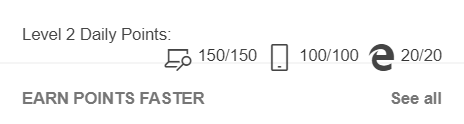
Each day you’ll have the opportunity to get your searches done. You get 5 points per search that you do on a PC browser, phone browser, and you can get bonus points for using an Edge browser. What I recommend is downloading the Edge browser (Iphone, Android) and use that for the sole purpose of doing your searches. It will allow you to have multiple search windows within it so I keep one with my phone browser, one with the browser set to pc mode, and one with my daily objectives. Setting of the search windows to pc mode (hit the “…” in the middle of the bottom then select ‘Desktop site’) counts as PC searches! When you go to Bing.com you can scroll down a bit and see the news stories and click through them, every new news story you click counts as a search as well! Most days that will get you just about all the way to 150 for the searches on the PC.
Have you ever used Edge browser or the Bing search engine before? If not you should give it a shot, you find that it is to your liking! Leave a comment and let me know if this has worked for you or if you plan on trying it out.


 Couch Potato 🥔 Millionaire
Leave a reply to Bing brought back referral rewards! Up to ~$6 passive income a month! – Couch Potato 🥔 Millionaire Cancel reply